

Why Kubernetes (K8s) is so crucial for your company
Kubernetes, an open-source platform that automates containerized applications’ deployment, scaling and management, is a crucial technology for businesses aiming to embrace microservices architecture and a necessary tool for modern application development and deployment. When implementing Kubernetes, relying on trusted, experienced and certified partners like Software Mind is essential.
Software Mind is a Kubernetes Certified Service Provider (KCSP) recognized by the Linux Foundation and Cloud Native Computing Foundation for its Kubernetes-related expertise. KCSP certification ensures we provide reliable support, seamless Kubernetes implementations, expert guidance, and enhanced security.
How does Kubernetes work?
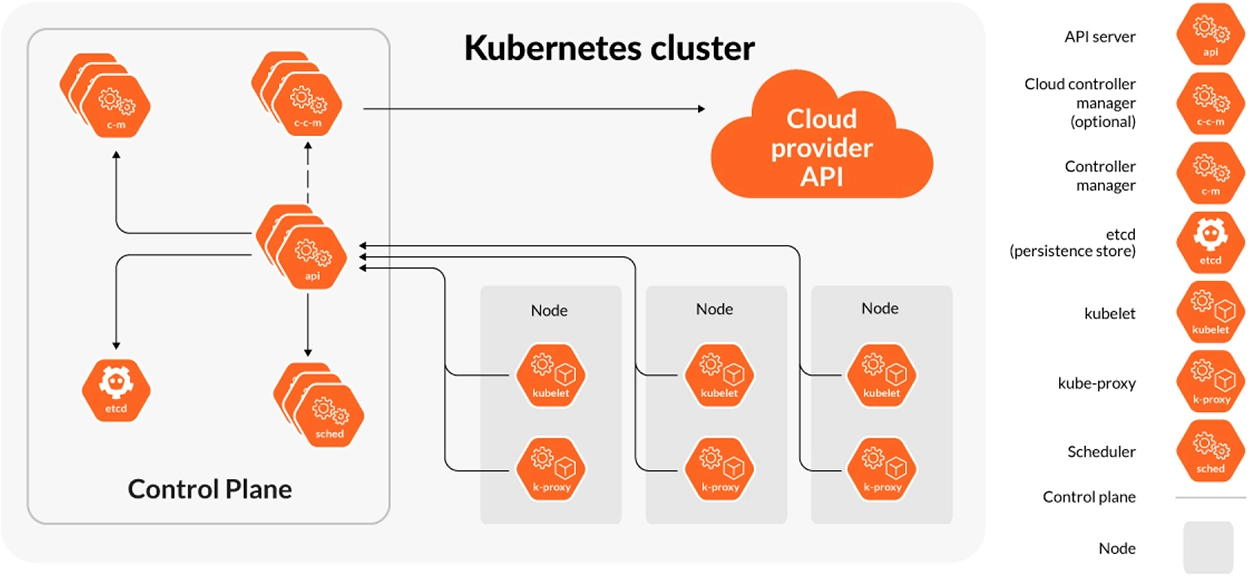
On the photo: The components of a Kubernetes cluster

Control plane
A Kubernetes control plane consists of an API server, controller manager, scheduler and some kind of persistence store – usually an etcd database. This is the brain of the cluster operation, and its primary responsibility is to keep track of running workloads (pods or sets of pods) to make sure they are in the desired functional state – even when a node on which a specific workload is running fails.

Worker nodes
Worker nodes components, kubelet and kube proxy, provide needed resources for pods running in a Kubernetes cluster – like CPU, memory, network communication or storage. Kubernetes makes these resources available through a system of plugins and standardized interfaces - such as CNI (network), CSI (storage) or CRI (runtime). Since these plugins are usually delivered by third parties, it’s worth checking if a provider or project you want to use is stable and proven on production. Our team highly recommends using mature projects from CNCF.

Container image registry & CI/CD
To run a pod in a Kubernetes cluster, you usually need to pull the image of a specific container from an external container image registry, for example a Docker registry or on-prem Harbor instance. Pods can be deployed on a cluster in a manual way or with the use of CI/CD pipelines, which automate the process of building, testing and deploying the images, thereby enabling faster development cycles and reliable releases.

Observability
Kubernetes exposes many different telemetry data (metrics, events, logs) from the workload and the cluster itself. As you are dealing in Kubernetes with distributed workloads, applications that can exist and communicate between different nodes and even geographic regions, it’s crucial to have the telemetry collected and visible in one centralized system to monitor, analyze and debug applications effectively.

Security
Security is a major concern in all IT systems, and the same applies to Kubernetes. A cloud native security model defines four layers in this matter: Cloud (or Datacenter), Cluster, Container and Code. A properly secured system cannot rely only on cloud security mechanisms or hardening in the code, you need to take into account all layers to ensure the best possible level of security of clusters and the whole environment.
Benefits of using Kubernetes for software development
By adopting Kubernetes as a solution, IT operations can improve their efficiency and speed up development cycles. This results in faster time to market and better cost optimization. With its advanced orchestration process, businesses can scale their applications more easily, while ensuring optimal performance and handling varying workloads for enhanced agility and responsiveness. Automating the deployment lifecycle reduces the chance of errors, speeds up release cycles and enables development teams to focus on other essential tasks.
Kubernetes vs Docker
Docker is a tool for containerization, while Kubernetes is a platform for orchestrating containers across clusters. When used together, Kubernetes acts as an orchestrator for Docker containers, allowing for the management and automation of container deployment, scaling and operation.
Docker provides a straightforward and efficient way to build and deploy containers, while Kubernetes offers more advanced functionality for managing containers at scale. Kubernetes can automatically replace failed containers with new ones, while Docker does not have such native self-recovery capacities and relies on third-party tools. It’s worth adding that the development community started the Open Container Initiative (OCI) that defines industry standards around container image formats and runtimes, thus creating a standard interface specification (Container Runtime Interface) that makes it possible to use any container environment runtime, for example containerd or CRI-O.
Our Kubernetes services

Implementation
Get seamless Kubernetes platform preparation and deployment with a comprehensive implementation service. Our experienced engineers possess experience with various Kubernetes setups, including Vanilla Kubernetes, and specific distributions such as Rancher, Red Hat OpenShift, K3s, as well as managed services like Google Kubernetes Engine (GKE), Amazon Elastic Kubernetes Service (EKS) and Azure Kubernetes Service (AKS).

Consulting
Boost your platform by planning and designing updated Kubernetes-based application architectures. We assist with the execution of transformation projects and guide both new implementations and existing ones. Whether you need assistance with further development planning or identifying bottlenecks within your deployment or overall architecture, our consultants are here to help.

Support and Maintenace
Empower your product with dedicated support teams 24/7 to provide tailored support for your Kubernetes platform and guarantee your applications run smoothly. Software Mind, which adheres to Service Level Agreements (SLAs) customized to meet your exact needs, promptly addresses and resolves issues that may arise.

Security Audits
Conduct thorough security assessments of your Kubernetes implementation and adhere to the up-to-date security standards. By performing audits to identify potential vulnerabilities, ensure your organization has a robust security system. Our experts will cover aspects such as security assessment and authorization, penetration testing, and the entire application security lifecycle.

Training
Embrace the opportunity to learn from certified Kubernetes instructors, expert consultants and battle-proven engineers, who incorporate real-life case studies into training sessions. Our training agendas are flexible and can be adjusted to meet the specific needs and requirements of your company or group to fit your Kubernetes needs.

Upgrades and migrations
Facilitate seamless migration between Kubernetes distributions, while delivering minimal downtime and maximum efficiency. Our experts handle cluster upgrades, ensure compatibility with newer Kubernetes versions and smoothly migrate workloads to leverage the latest Kubernetes features without disruptions. Optimize performance and scalability and implement the necessary observability tools.
Where can Kubernetes development services be used?
Telecom
Building 5G networks or cutting-edge custom telecom solutions to automate network lifecycle management, improve scalability, boost performance and deliver a more cost-effective solution. Improving operational agility and reducing maintenance costs through CI/CD methodologies.
E-commerce
Empowering businesses to launch robust and fully scalable products like stable storefronts capable of handling high traffic. Facilitating the deployment and management of microservices architecture to deliver the best possible solutions for the customers.
Travel and leisure
Deploying advanced platforms for handling travel-related solutions, managing customer data securely and guaranteeing seamless online booking experiences, even during periods of high-demand.
Financial services
Modernizing financial services development, enhancing security, scalability and time to market. Accelerating digital transformation with the development of consumer banking platforms, regulatory compliance solutions and financial reporting platforms.
Sports betting and online casinos
Ensuring uninterrupted services for sports betting platforms and online casinos. Allowing the handling live betting, securing payments gateways and scale backend systems to manage a large number of concurrent users.
Healthcare and biotech
Managing electronic health records, providing data analysis and ensuring HIPAA-compliant applications deployment. Supporting development of digital healthcare platforms and accelerating advanced medical research.
Case studies





Kubernetes development services – FAQ
What are Kubernetes Services?
Kubernetes services are defined as a logical abstraction that represents a particular set of pods where an application is running. It also defines an access policy used for that group of pods. Pods are the smallest execution units that you can create and manage in Kubernetes. One pod represents a group of one or more containers (lightweight packages that represent a full runtime environment of an application and its dependencies) that share network resources and storage. Since the lifespan of Kubernetes pods is short, a service is used to assign a name and unique IP address (clusterIP) to a group of pods that provide specific functions (f.ex. web services). That IP address will remain intact as long as the service exists. In the end, the service’s role is to be a reliable endpoint for communication between applications (or components).
What are the best practices for Kubernetes?
How to autoscale an application in Kubernetes?
What are common problems when using Kubernetes?
We'd love to hear from you!
Fill out the form - we'll get back to you as soon as possible
Software development insights
Get expert advice and best practices on software development solutions.