





Table of contents:
Safe authentication and authorization are key to securing your systems and controlling access to your resources. Authentication enables you to verify the identity of a user who wants to access your system, while authorization defines what actions they can take.
If you’re using Kubernetes, it has its own internal access control mechanisms, but manual access management can be time-intensive and ineffective, especially for solutions with many users and complex role structures. But you can further strengthen identity and access management in your Kubernetes-based software by integrating Keycloak and OpenID Connect (OIDC). Read on to explore the advantages of this solution and how to implement it effectively.
Kubernetes, OIDC and Keycloak – what you need to know
Kubernetes (also known as K8s) is an open source platform for automating the implementation, scaling and management of containerized applications. Its internal role-based access control (RBAC) mechanisms enable you to control user permissions within a cluster. These mechanisms include:
- Role and RoleBinding – permissions for a particular namespace,
- ClusterRole and ClusterRoleBinding – permissions for a cluster-wide role.
OpenID Connect is an interoperable authentication protocol based on the OAuth 2.0 framework of specifications (IETF RFC 6749 and 6750). It enables applications to confirm users’ identity via an external identity provider (IdP) using ID Tokens. It also allows them to retrieve basic profile information in a secure and privacy-respecting way.
Keycloak is an open source identity and access management system compatible with OIDC. It gives you access to such features as logging and user registration as well as user, group and role management.
What are the benefits of integrating Keycloak and OIDC with Kubernetes?
Integrating these solutions enables companies to centralize user management and information about existing permissions. It enables you to configure permissions (e.g., to transfer users to different groups with various access levels) more easily and flexibly as you can administer permissions from one centralized interface. The integration also facilitates secure logging to your system and access to your Kubernetes clusters.
Additionally, centralized identity and access management empowers you to strengthen your system security, support the Zero Trust approach and prevent cybersecurity attacks that exploit incorrect access configurations. By effectively authenticating users and managing their permissions, you can decrease the risk of data breaches, credential theft attacks and unauthorized access to sensitive data. For example, when you safely manage permissions, you can keep your system safe from the RBAC buster attack in which malicious actors gain access to API servers with improper configurations and persistently misuse a company’s resources.
From a user’s perspective, the integration results in a smoother logging process. When using software with a single sign-on (SSO), users only need to remember one set of logging data instead of managing different passwords to every tool.
How the integration of Kubernetes and Keycloak works
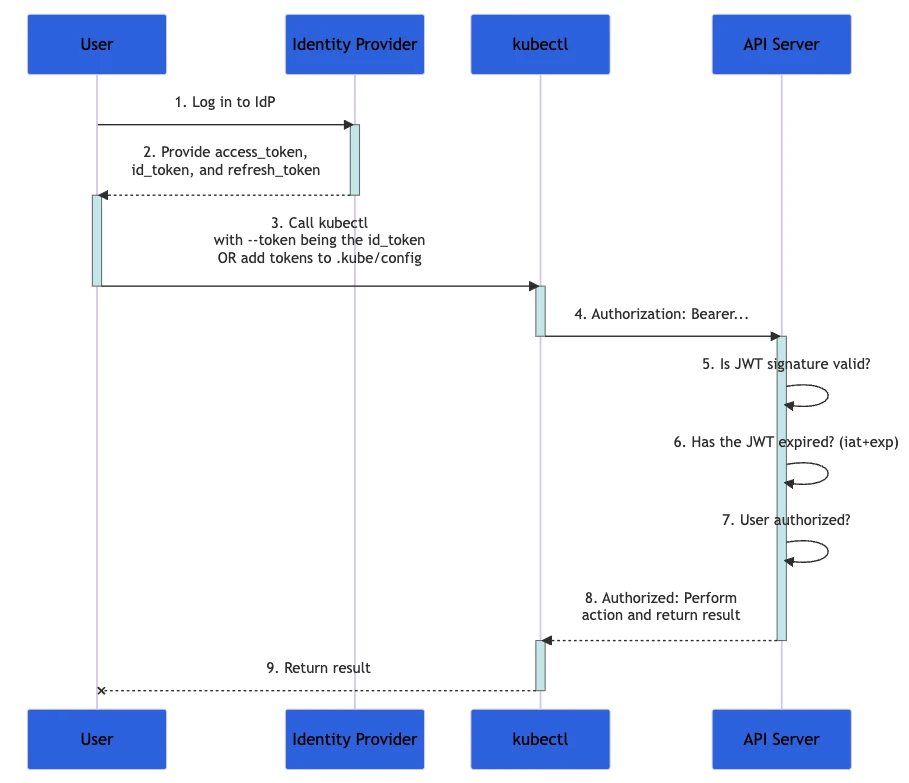
The process of accessing a Kubernetes cluster is based on the OIDC standard. When a user tries to execute an action that requires permissions, they generate a kubectl command. A system with integrated Kubernetes and Keycloak uses a kubectl OIDC credential plugin (e.g., kubelogin). If the user’s OIDC token is missing or expired, the API server responds with the 401 Unauthorized error. The credential plugin then triggers a new login flow, prompting the user to authenticate their identity through Keycloak.
The user confirms their identity, and Keycloak issues an ID token. The credential plugin receives and caches this token, then automatically attaches it as a Bearer token in the Authorization header of each subsequent request to the Kubernetes API server. The API server verifies the token’s signature locally using the OIDC provider’s public keys (fetched from Keycloak’s JWKS endpoint). Depending on whether the authentication is successful or not, Kubernetes applies its RBAC rules to determine whether the user has the required permissions to complete their activity.
Here’s a diagram depicting this process where Kubernetes is the API Server and Keycloak the Identity Provider.
Kubernetes and Keycloak integration – a practical example
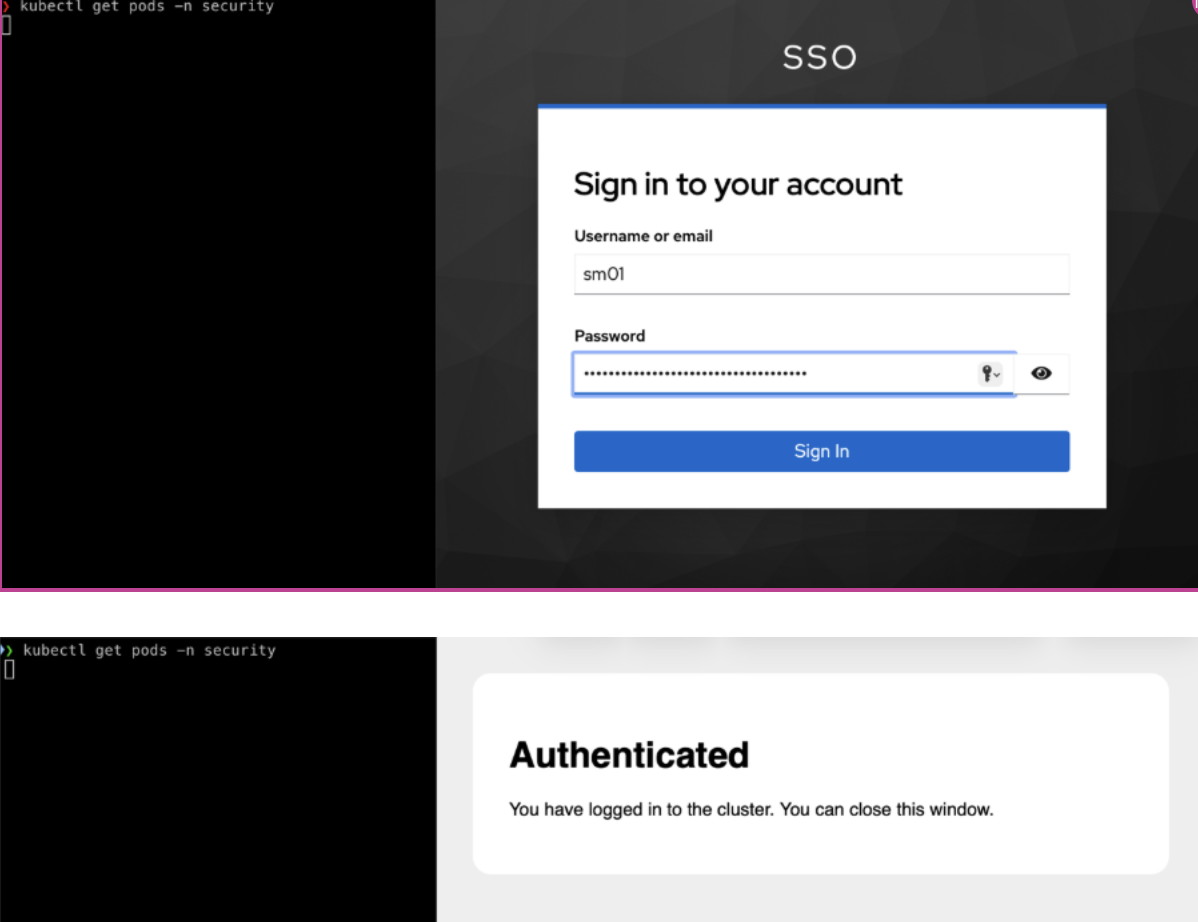
Here you can see the Keycloak interface where a user logs in. After Keycloak successfully verifies the user’s identity, it generates a set of OIDC tokens, out of which the ID Token in the JWT format is essential. Here’s what an example ID Token looks like:
{"exp":1770388368,"iat":1770388068,"auth_time":1770387794,"jti":"1e95db4a-a528-43e2-8957-0cf27b7f498b","iss":"https://keycloak.10.7.4.230.nip.io:8443/realms/sso","aud":"k8s","sub":"e7e68458-e8d0-4abe-99fa-e111db021739","typ":"ID","azp":"k8s","nonce":"ZnkzlYI_Z3o_JhZn0UNAf8dgel-xG4g2uEYP_3698EA","sid":"0eac21c3-77a4-45af-add2-a9461dd9c540","at_hash":"5OesfI-oYx0CpsSBgu7fXw","acr":"0","email_verified":false,"name":"SM SMAA","groups":["ADMIN","security-developer"],"preferred_username":"sm01","given_name":"SM","family_name":"SMAA","email":"test@localhost"}
Next, the token is saved locally and added in the Authorization: Bearer header to each API call (in other words, each time the kubectl command is activated). The Kubernetes API server doesn’t directly communicate with Keycloak during request processing. Authentication in this process is stateless – based on public keys, fetched by the Kubernetes API server from Keycloak’s JWKS endpoint, and done by verifying the JWT signature, issuer, aud claim and token expiration. To carry out the process this way, you need to adjust the API server configuration.
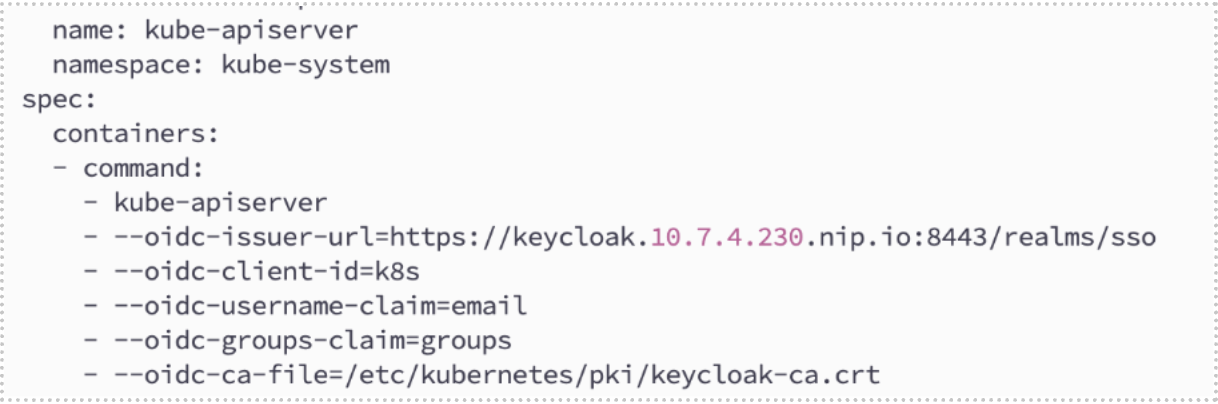
In the configuration above it’s important that oidc-issuer-url is identical to the token’s JWT Issuer (iss). You can check this in /.well-known/openid-configuration. Here’s what the other parameters mean:
- oidc-client-id – defines the recipient of the token; in this example, it’s Kubernetes.
- oidc-username-claim=email – the Kubernetes username will be required to be an email.
- oidc-groups-claim=groups – Kubernetes will read the Groups table.
- oidc-ca-file – this is the certificate authority (CA) that signs the Keycloak certificate.
This process also verifies standard claims, such as the issuer and token expiration time.
After a successful token validation, the API server maps the user identity and the groups contained in the token onto Kubernetes’s internal authorization model. This is an example of a cluster role (in this case, security-developer):
kind: Role
metadata:
namespace: security
name: security-developer
rules:
- apiGroups: [""] # core API group
resources: ["pods"]
verbs: ["get", "list", "watch", "create", "update", "delete"]
- apiGroups: ["apps"] # deployments, replicasets
resources: ["deployments"]
verbs: ["get", "list", "watch", "create", "update", "delete"]
Here’s the JWT token value generated in response to it:
"groups":["ADMIN","security-developer"]At this stage, Kubernetes activates an RBAC mechanism that determines whether this identified user is allowed to complete requested action. If the RBAC rules grant the user necessary access, the request is approved and the outcome is sent to kubectl.

Using the inbuilt Keycloak mechanisms enables you to flexibly manage groups and users, which results in increased flexibility when it comes to managing your Kubernetes cluster.
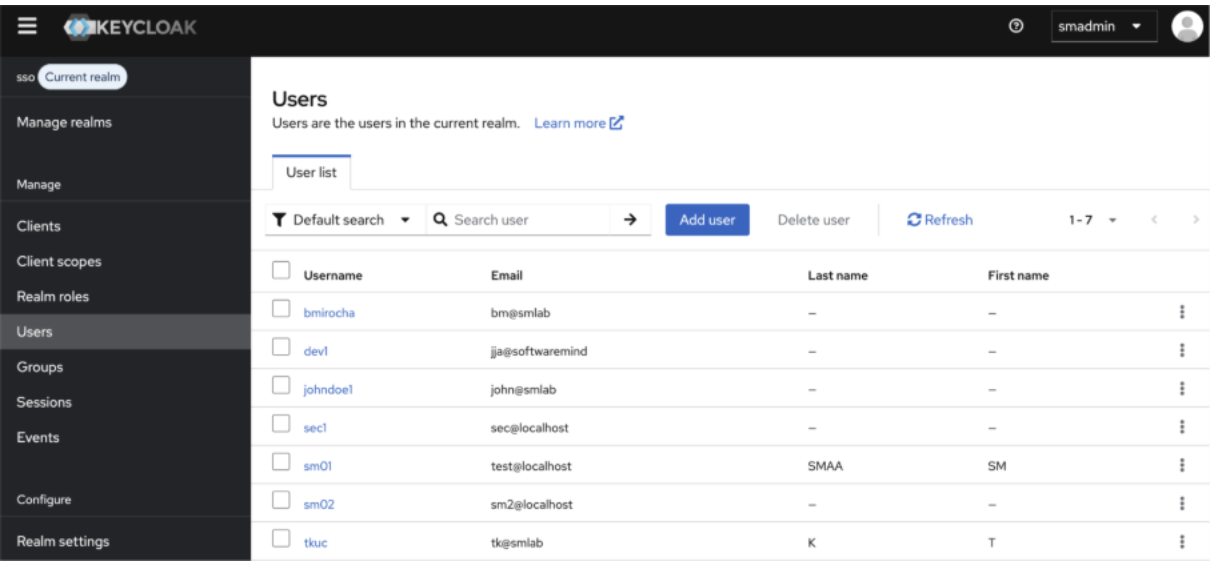
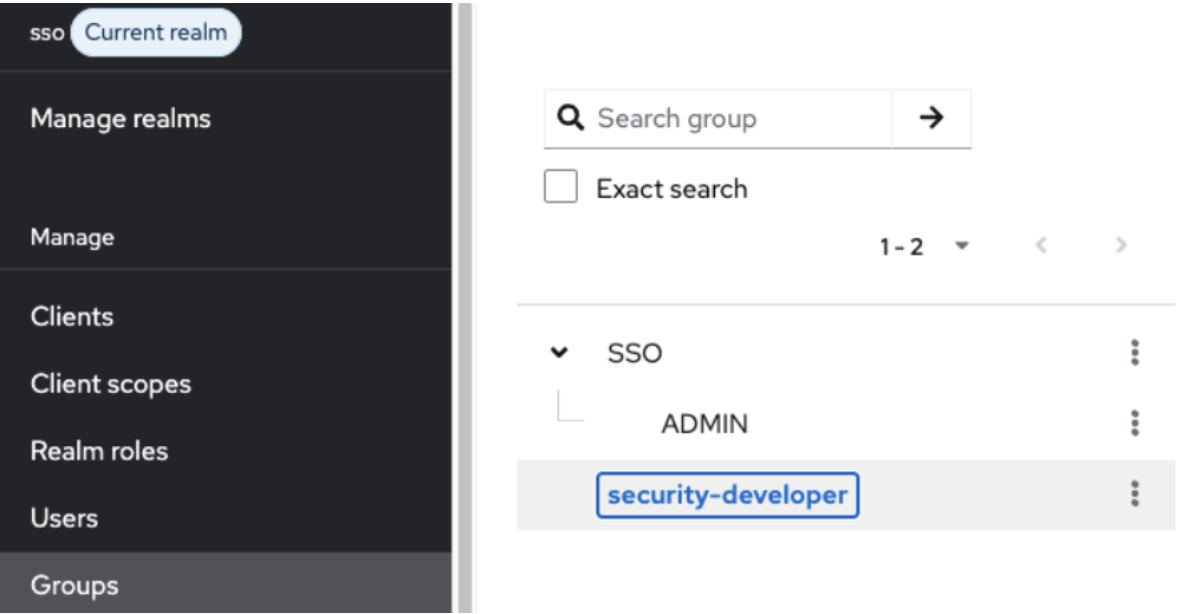
These definitions enable you to carry out the authentication mechanism in Keycloak, while Kubernetes is responsible for authorizing access to your cluster resources.
Common issues and traps when integrating Kubernetes and Keycloak
One problem you might encounter when configuring your Kubernetes and Keycloak integration is an error in verifying the SSL certificate between the Kubernetes API server and Keycloak. This typically occurs when Keycloak uses a self-signed certificate or a private CA that the Kubernetes API server doesn’t trust by default. To diagnose the issue, run curl -v in /.well-known/openid-configuration and check whether the certificate chain is valid and trusted. To fix this problem, use the CA from the keycloak-ca.crt file and designate –oidc-ca-file.
Another common problem is incompatibility between username-claim and groups-claim. By default, Kubernetes treats users as subjects (entities that make requests for access). But if your RBAC mechanisms (RoleBindings) are based on an email address and oidc-username-claim is set to preferred_username, the user won’t be granted any permissions despite successful authentication.
Remember that the oidc-groups-claim isn’t the same as the name claim you’ll find in a token. For example, a token might include realm_access.roles – a default configuration of realm roles. To fix this issue, take a look below at a Keycloak configuration that ensures compatibility between username and groups claims. The value for oidc-username-prefix is a special case. It equals no prefix, which means it turns off the default prefix.
oidc-username-claim=email
oidc-groups-claim=groups
oidc-username-prefix="-"
oidc-groups-prefix="oidc:"
Finally, a short access token lifespan forces users to frequently log in, which might be disruptive. That’s why it’s recommended to set the access scope value to offline_access so that kubelogin can receive a refreshed token even when a user’s session in Keycloak has expired. Here’s an example of a correct configuration that addresses this problem:
users:
- name: bm
user:
exec:
apiVersion: client.authentication.k8s.io/v1beta1
command: kubelogin
args:
- get-token
- --oidc-issuer-url=https://keycloak.10.7.4.230.nip.io:8443/realms/sso
- --oidc-client-id=kubernetes
- --oidc-extra-scope=openid,profile,email,offline_access
- --oidc-username-claim=email
- --oidc-groups-claim=groups
- --oidc-use-pkce
- --grant-type=authorization_code
Best practices for secure authentication
To boost the security of the authorization process, it’s a good idea to implement additional authentication steps so that logging in doesn’t only rely on a user password. This could mean enforcing a one-time password (OTP) – a temporary code or PIN that only works for a unique login attempt. This method can be paired with multi-factor authentication (MFA) when an OTP is sent to a device (e.g., a phone), email address or an authenticator app the user has.
This mechanism can also require a security key (e.g., YubiKey), which is a piece of hardware that can be used to authenticate a user’s identity by plugging it to a port in a user’s computer or holding it to their phone (with NFC enabled).
These additional authentication methods offer stronger protection. Because they require other authentication steps, they can prevent attacks even when a traditional password is exposed. OTP validity is also limited, which means attackers have less time to steal credentials.
Along with strong authentication, it’s also recommended to ensure token security by correctly configuring to lifespan access and refresh tokens. Transport Layer Security (TLS) encryption, strong password security and IP-based restrictions will further make your resources safer from attacks and credential theft. Integrating security information and event management (SIEM) systems and enabling audit logs will add another layer of protection and help you better manage security incidents.
Identity provider alternatives to Keycloak
Depending on the requirements and needs of your project, you might want to explore other identity providers that could be integrated with Kubernetes. One potential option is authentik. It’s an open source, self-hosted IAM tool that supports OIDC, SSO, MFA, Security Assertion Markup Language (SAML) and Lightweight Directory Access Protocol (LDAP).
There are also commercial solutions that you can integrate with your system. For example, Descope is a customer identity and access management (CIAM) platform that enables fast implementation of passwordless mechanisms and passkeys. Okta is another IAM solution provider that offers an enterprise SaaS platform for smooth and safe authorization.
One thing to keep in mind, when deciding on a solution, is that with an open source provider your organization will have to host and manage the IAM infrastructure. It gives your more control over the IAM services, but it also requires skills and generates maintenance costs. On the other hand, a commercial solution might be easier to deploy, it doesn’t require maintenance on your part and it provides service support. But you don’t have as much control over the services, and a potential service disruption, while rare, might negatively impact you.
Keep your systems safe with strong authorization
The integration of Kubernetes with Keycloak and OIDC improves protection for your resources and establishes smooth and consistent authorization. Centralized user management empowers your team to ensure the right level of access for everyone and facilitates the management of a large and complex user base. This integration based on open source solutions is an excellent starting point for building a more secure environment and improving IAM in your system.
As cybersecurity requires specialized skills and knowledge, many companies turn to technology partners like Software Mind to boost their system safety and develop highly secure solutions. If you want to find out how our experts can help you protect your data and mitigate risks, get in touch.
FAQ
How can you benefit from integrating Kubernetes with Keycloak and OIDC?
This integration helps centralize user management, increase the flexibility of permission configurations and improve the overall security of your system by strengthening identity and access management.
What are some best practices for authenticating users?
To improve security, don’t rely solely on traditional passwords. Implement additional login methods like a one-time password (OTP) and multi-factor authentication (MFA) to ensure better protection and compliance.
Should you use an open source or commercial identity provider?
It depends on your organization’s needs and requirements. An open source solution requires you to host and manage it yourself. With a commercial identity provider, you don’t have to maintain the services and you get access to service support, but you have limited control over the solution.

About the authorBartosz Mirocha
Principal Software Engineer
A Principal Software Engineer with over 10 years’ experience in software development, Bartosz has developed solutions and managed engineering projects for companies across a range of industries, including telecom, security, payments, media and travel. With his extensive expertise in a variety of tools and technologies, including Java and Kubernetes, Bartosz helps businesses build advanced technical architectures, create innovative design patterns and model effective development and business processes.

About the authorTomasz Kuc
Principal System Engineer
A Principal System Engineer with over 20 years of experience in the IT industry, Tomasz has implemented numerous systems and worked on various IT projects focused on enterprise-class solutions. As a cybersecurity team member, Tomasz conducts security audits and penetration tests that help organizations identify and eliminate potential threats. Along with collaborating with teams responsible for developing and maintaining IT infrastructure, he provides support in creating security strategies and implementing solutions that meet required standards.